Education · September 12, 2026 · 8 min read
Interactive wall in schools: moving the class without losing the lesson
Students spend most of the school day sitting down, and teachers know it better than anyone. Here is how schools work on math facts, vocabulary and attention with students on their feet, without losing the thread of the lesson or a quarter of an hour settling everyone back down.
The problem is not boredom, it is seat time
An elementary student spends most of the day in a chair, and most of the fixes for that ask the teacher to step outside the lesson: go down to the yard, push the desks back, book the gym. Anything that costs instructional time is quietly dropped by November.
Movement breaks work on paper. In practice they run into two obstacles every teacher knows: they cut the thread of the lesson, and settling the room again sometimes eats more minutes than the break itself.
An interactive wall moves the problem rather than solving it through willpower. The break stops being an interruption and starts carrying the lesson: students stand up to answer, and what they are looking for is exactly what was on the board five minutes earlier. Going back to their seats needs no transition, because the subject never changed.
Answering with the body instead of raising a hand
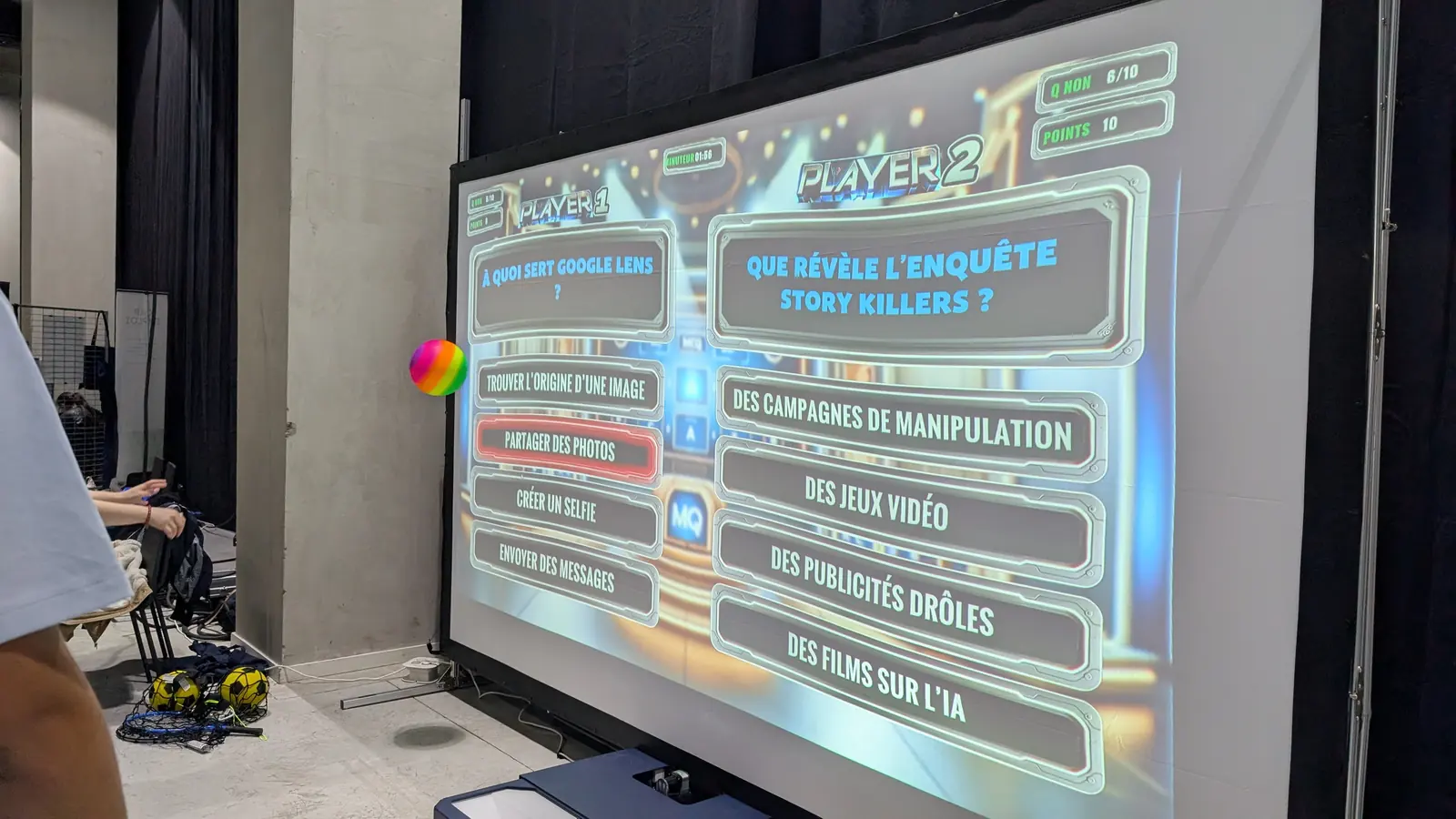
The principle fits in one sentence. A question or an image is projected onto the wall, and the student answers by throwing a foam ball at the right target or touching it with a hand. The sensor reads the impact, the display reacts within a second, and the point is scored with nobody refereeing.
That shift in gesture produces an effect teachers notice in the first session: the student who never raises a hand throws. Answering no longer exposes them in front of the group, and a wrong answer is corrected in three seconds, with no comment and no record.
Touch points are unlimited, so several impacts land at once without any of them being lost. Games run with five players at a time and sixteen in relay, which is enough to rotate a whole class with nobody queuing behind a screen.
- Math facts routine: the answers appear, the student aims at the right one
- World language vocabulary: the picture on one side, the word on the other
- Science: sorting foods, placing an organ, matching an animal to its habitat
- End of the day: a shared accuracy game, when attention has already gone
The content comes from the teacher's own plan, not from a catalog
A teaching tool does not survive a school year if it imposes its own content. That is why Editor mode weighs more heavily in a school's decision than the number of games shipped with the system.
In practice the teacher types in word lists, times tables and questions, and imports their own images. Thursday's session then covers Tuesday's lesson, with the vocabulary the class actually worked on, rather than generic content that vaguely resembles the curriculum.
Thirty games work for life with no subscription and carry the first weeks while the team finds its footing. The schools and K-12 education page sets out the uses grade by grade and subject by subject, from a math facts routine to a health education unit.
Five minutes to set up, or the equipment stays in the closet
The deciding factor is not how good the games are, it is how long setup takes. Equipment that needs a quarter of an hour of preparation gets used on open house night and stays put the rest of the year, which every school has already lived through with something else.
The K-Mobile E is a wheeled unit with the projector built in, deployed in five minutes with no tools. It moves from one classroom to the next, from the library to the multipurpose room, and goes back in the closet at the end of the session.
The K-Station E stays permanently installed in a motor skills room or a dedicated space: you walk in, switch on, and play. The choice between the two almost always comes down to one question, whether the school can give up a room for it.
Neither configuration depends on the school network. A power outlet and a light-colored wall are enough, which rules out sessions lost to an unavailable Wi-Fi network or to content filtering that blocks more than it should.
Students with special needs play the same activity as everyone else
In a special education classroom or during an inclusion block, the everyday difficulty is short to state: finding the activity where a supported student takes part without an adaptation the group can see. A differentiated worksheet is spotted instantly, and the student spots it first.
On the wall it is the gesture that adjusts, not the exercise. Throwing from a chair, touching the target by hand, aiming at a wider zone, playing in pairs on the same answer: the instruction on screen stays the same for the whole class, and nobody is playing a separate game.
One point has to be stated plainly, because it comes up in every support team meeting: Kmoove is not a medical device and replaces no assessment or therapy. Special education settings use it as an activity tool, and the disability services and special education page describes those uses in detail.
How many students can play at the same time?
Five at a time, sixteen in relay on the same game. The rest of the class is not left watching: teachers who rotate groups every two or three questions keep everyone moving, and waiting time is counted in seconds.
For a class of twenty-five to thirty, the format that works best is teams: four or five groups, one thrower at a time, rotation on every point. The group waiting is not really waiting, it is working out the answer for its thrower, which settles the noise question along the way.
Do we need tablets, student accounts, a connection?
No to all three. The system needs no individual device, no login to create and no permanent connection in order to play. That is what separates an interactive wall from a computer lab: the tool is collective, and it does not add one more screen per child to a day that already has plenty.
That absence of accounts has a consequence administrators appreciate: no student personal data is entered to start a game, which shortens the conversation with families and keeps the district privacy paperwork short.
Teams running active learning with adult groups will find the same principles on the training and active learning page, with different content and the same participation mechanics.
Who pays for it, and from what budget?
Configurations start at €5,990 excluding VAT. In a public school the purchase usually sits with the district or the municipality, and the system also serves after-school and summer programs, which weighs on the decision.
The thirty built-in games carry no subscription, so the purchase creates no recurring charge to justify in later years. That is the point finance offices check before anything else, ahead of the features list.
We answer any request within forty-eight working hours, and a demonstration in the school remains the most honest way to decide: your students try it, the team watches a real session, and we check the wall, the throwing distance and the power supply together before any quote. The pricing page lists the six configurations.
Related sectors
Featured models
Ready to see the interactive wall in your facility?
Request a quote and we will get back to you within 48 hours with configuration and pricing.