
Healthcare and disability services · August 12, 2026 · 5 min read
Interactive wall in a nursing home: how a session actually runs
A session on an interactive wall needs no controller, no headset and no individual screen. Here is how it actually runs in a nursing home, from plugging it in to the end of the activity.
Before the session: a power outlet is enough
The system works without Wi-Fi. Every activity is built into the unit: staff plug it in, switch it on and start the activity. A permanently installed K-Station keeps the room ready at all times. A K-Mobile takes about five minutes to set up, with no tools required.
The projected image measures two to four meters (roughly 7 to 13 feet) wide. It is adjusted to fit the room: dining hall, activity room, wide corridor or physiotherapy room.
During the session: the gesture is the only control
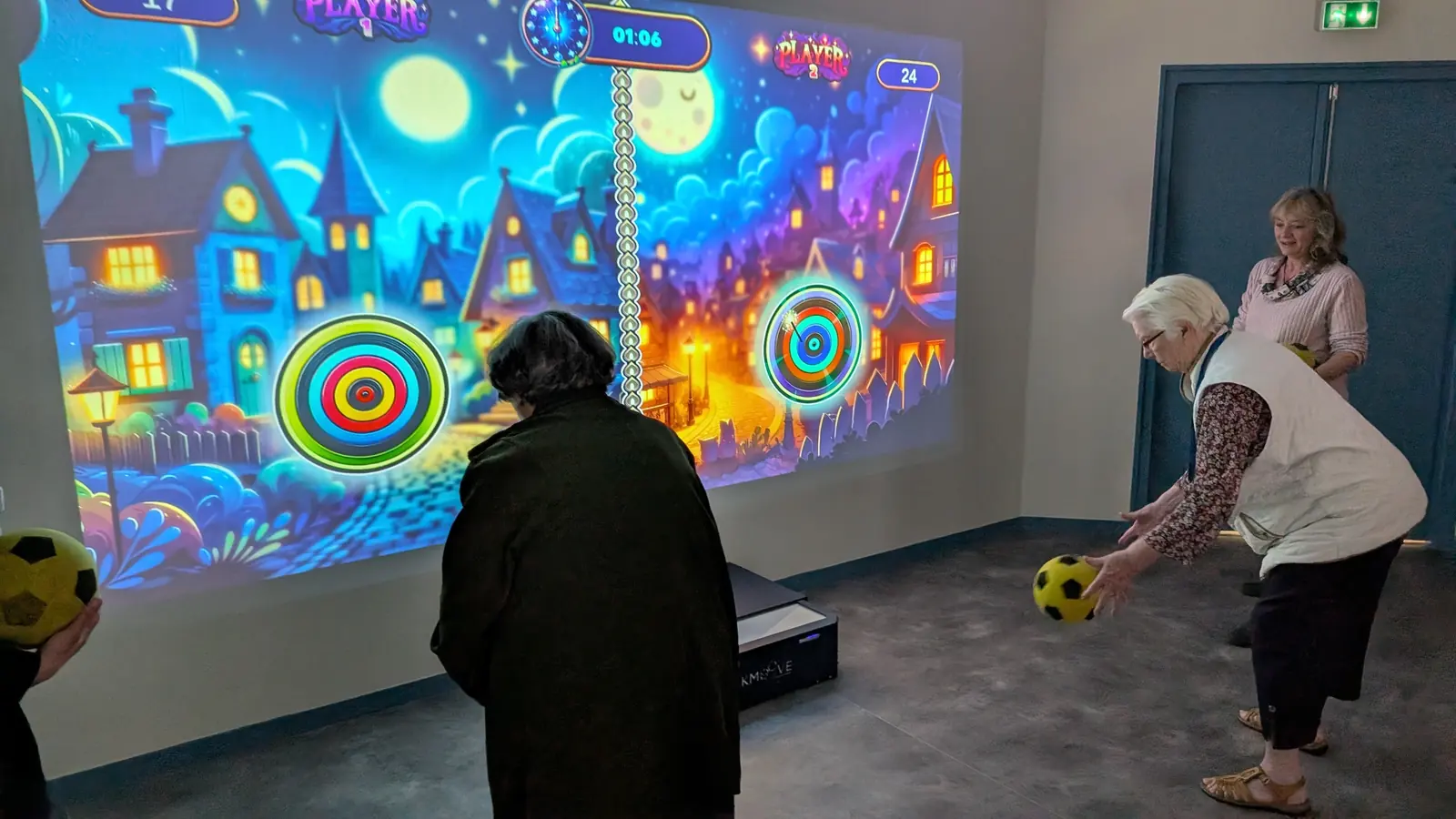
Residents touch the wall, throw a foam ball or wave a hand in front of the surface. The sensor detects up to twenty simultaneous contact points, so several people can play at the same time without waiting for their turn.
Standing, seated on a chair or in a wheelchair, everyone joins the same activity. The activity leader adjusts the image height and the game difficulty to suit the group.
- Laser detection by default: no image of participants is ever recorded. The K-motion camera remains an option, activated only if you choose it
- Up to five simultaneous players and sixteen in relay
- Activities focused on dexterity, motor skills, coordination and letter or number games
After the session: personalizing it for next time
On versions with Editor mode, staff can replace the images and words used in the games with their own content: photos of the facility, local memories, vocabulary from a workshop. Preparation takes a few minutes and requires no technical skill.
How many residents take part at once
Five residents play at the same time on the wall, and sixteen can take part in the same game by taking turns. That matches the size of a typical activity group. The residents waiting their turn watch, comment and encourage the others, which is part of the activity rather than dead time.
The number of impacts detected at once is not limited. In practice, an activity leader can let two residents play side by side on the same area without having to police who touches when, and without the wall losing track.
Residents in wheelchairs play on the lower part of the image, standing residents on the upper part, and both take part in the same game. Nobody is placed to one side because of what they cannot do.
What the activity leader actually does
No technical skill is required. The leader switches the unit on, picks an activity from the menu and starts it. Target size, speed, round length and the number of options are adjusted between rounds, in a few seconds, without anyone in the room noticing.
That adjustment is the whole point. A group in a nursing home is never uniform: some residents are independent and get bored if the game is too easy, others are disorientated and lose the thread of a long instruction. Being able to change the level mid-session is what keeps everyone in the room.
A session usually runs in three parts. Five minutes to settle the group and start with something very simple, twenty to twenty-five minutes of activity with a change of game every two or three rounds, then five quiet minutes before residents go back to their rooms or to the lounge.
Fitting it into a schedule that is already full
The simplest approach is to use a slot that already exists: the Tuesday afternoon memory workshop, a group activity, an adapted physical activity session. The wall slots into it instead of adding another appointment to a crowded diary.
Twenty games are built in and work for life with no subscription, so a team can run sessions for years without buying anything else. Beyond those, the Kmoove Store adds content by the pack or by the item, bought outright or on subscription, entirely at the team's choice.
The K-Mobile takes five minutes to set up with no tools, which makes it possible to run a session inside a secure unit rather than bringing residents downstairs. The K-Station stays permanently installed, so the room is always ready.
What the system does not do
It records no health data. Results stay local to the wall, and only a first name may be entered. Teams who want to track progress note qualitative observations instead: how long a resident stays engaged, whether they stand up unprompted, whether they speak during the activity, whether they ask for the next session.
The wall is an activity tool. It is not a medical device, and it replaces neither an assessment nor the judgement of a healthcare professional. Detection uses a laser sensor by default, which captures no image at all. An optional K-motion camera detects the body without a ball or object, for residents who cannot throw or reach the wall.
For the full picture of how the system is used across care settings, see the nursing homes and senior living page.
How long does a session last?
Thirty to thirty-five minutes in total, and that is deliberate. Five minutes to settle the group and start something very simple, twenty to twenty-five minutes of activity, then five quiet minutes before residents go back. Ending while engagement is still high is what makes residents ask for the next session.
Can residents in wheelchairs take part?
Yes, and without a separate activity. The projected image is two to four meters (roughly 7 to 13 feet) wide and the playing area is adjusted to it, so seated residents play on the lower part while standing residents play higher up. Both take part in the same game, at the same time, which is the point: nobody is moved to one side.
For residents who cannot throw or reach the wall, the optional K-motion camera detects body movement without a ball or any object.
Does it suit residents living with dementia?
Teams use it in secure units, and the two adjustments that matter are pace and length. Short rounds of two to three minutes, one instruction at a time, and content built from familiar images. Editor mode lets staff build activities with photographs of the home, of the local town or of the staff themselves, which reaches residents that generic content does not.
It is an activity tool, not a therapy. It records no health data and replaces no clinical assessment.
How many staff are needed?
One. No technical skill is required: switch the unit on, choose an activity, start it. Levels are changed between rounds in a few seconds. A second person helps with a large group, as with any group activity, but the equipment itself needs nobody dedicated to it.
What does it cost?
From €5,990 excluding VAT. The final figure depends on the configuration: fixed or mobile, with or without the ultra short throw projector, S or E version, optional camera, content packs and warranty length. Twenty games are built in and work for life with no subscription, so there is no obligatory recurring cost. The pricing page sets out the six configurations.
Featured models
Ready to see the interactive wall in your facility?
Request a quote and we will get back to you within 48 hours with configuration and pricing.